
Cloudflare, the American Society that deals with internet security services, CDN (Content-Delivery-Network), and distributed DNS services, has recently started its partnership with WP Engine ( the WordPress digital experience platform that provides brands solutions to create remarkable sites and apps on WordPress ) to create his new WP plugin, which is amazing, except the fact that unfortunately, this plugin can’t provide all the benefits of the functions that are already offered by Cloudflare Stream strong API library.
For this reason, we have created our cf power tools plugin that take the best part of cf stream plugin by integrating new powerful functionalities such as the importation in the bulk of all your videos from Cloudflare to WordPress and even from external public URLs with one click, by restricting your video only for certain domains or getting all the videos analytics you need directly in WP, etc…
Here you can find all the new opportunities, differences, and features between cf stream video and our plugin cf power Tools create for you by our team
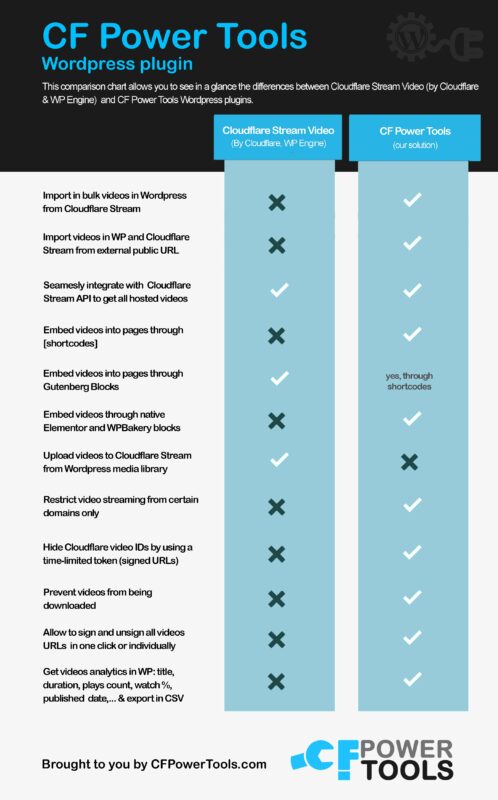
One of the best parts of this cf stream plugin is not only the ability and flexibility to adapt to each program according to your needs, but also the incredibly user-friendliness!
Yes, because one of our main thought was to create something that to use for everyone…from the developer to the blogger or the freelancer who wants to insert his video course in his site, having total control of its content, without the fear that they will be downloaded without is permission.
So you won’t need to struggle to study how it works the platform or the API interface.
Even if your video is already embedded on Youtube. You will only need:
In addition, to make things even easier, you will receive the video ‘step by step’ of how to upload your first video content with cf power tools not to mention the constant support you can receive from our team, always ready to help you and answer to all your doubts and concerns.
Still undecided whether to try cf stream WP plugin or not?

1. CF Power Tools è installato su centinaia di siti web. C'è un motivo per cui i nostri clienti mantengono l'abbonamento a CF Power Tools: ne apprezzano i vantaggi!
2. Una delle nostre convinzioni principali è che mettiamo i nostri clienti al primo posto, SEMPRE, e facciamo tutto il possibile per assicurarci che la vostra esperienza con CF Power Tools sia un successo.
Questa garanzia copre un periodo di 14 giorni senza domande e durante questo periodo faremo tutto il possibile per aiutarvi ad avere successo.
We hope you enjoyed reading about our cf power tools WordPress plugin. This plugin is the best and fastest way to connect to all your CloudFront distributions and improve your site to make it more popular on the web.
Your affordable easy option to take all the benefits of Cf stream through your WordPress site with new and powerful features.
If you liked our article, please share it with your friends or community!
Thank you very much! And if you want to take a look at our plugin and receive more info click here