
A complete Wordpress Plugin to integrate Cloudflare Stream

Easily integrate Cloudflare® Stream service and Wordpress:
import & manage videos, sign URLs & get analytics in one single WP plugin.
2 minutes installation & no skills required.

With our WordPress Plugin you can easily import and sign URL of your Cloudflare Stream videos and manage them in Wordpress.

Cloudflare WordPress Plugin

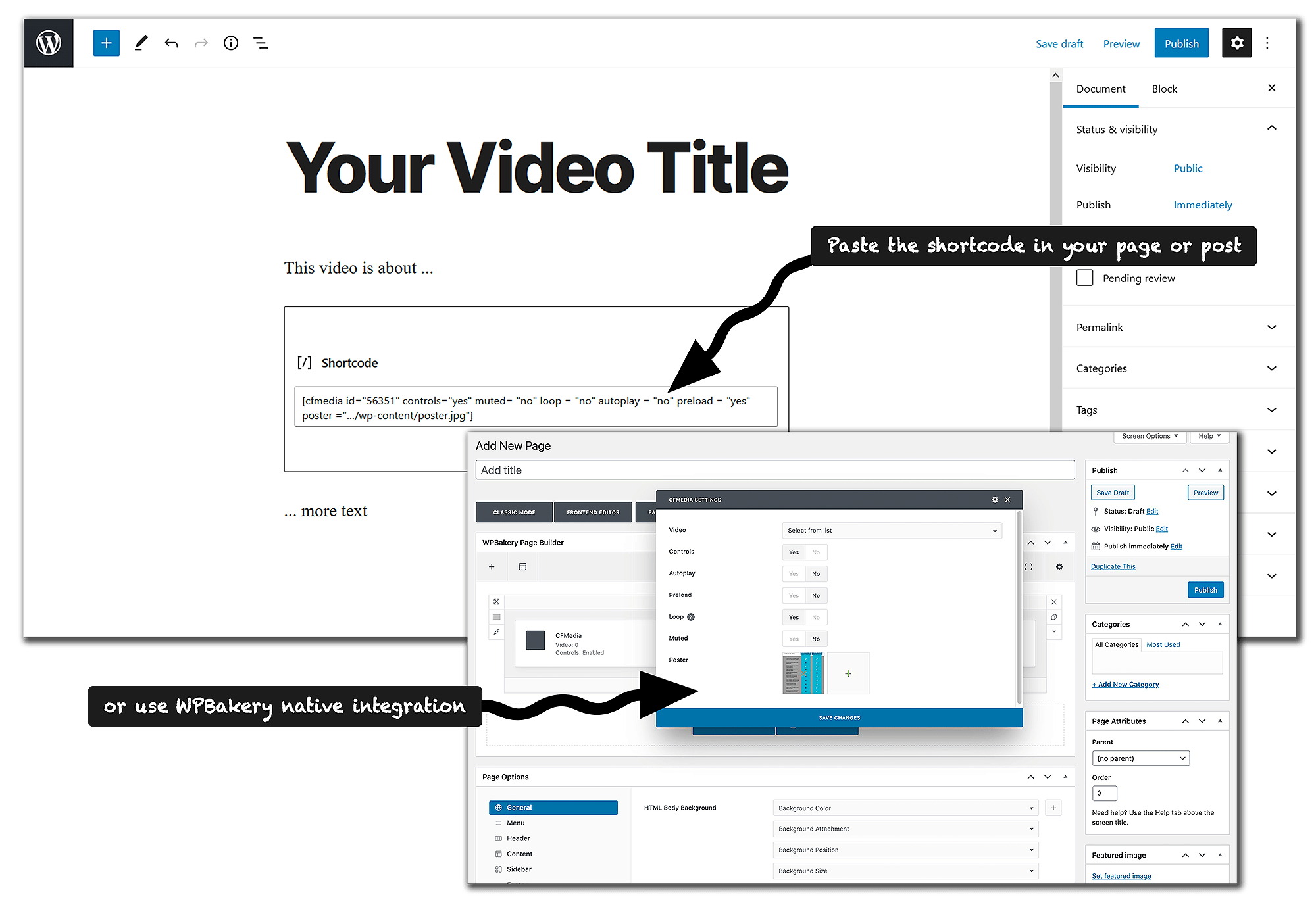
It's just a matter of a few clicks to integrate your Cloudflare Stream videos into your content with our shortcodes or native Elementor and WPBakery Wordpress plugins.​

Cloudflare WordPress Plugin

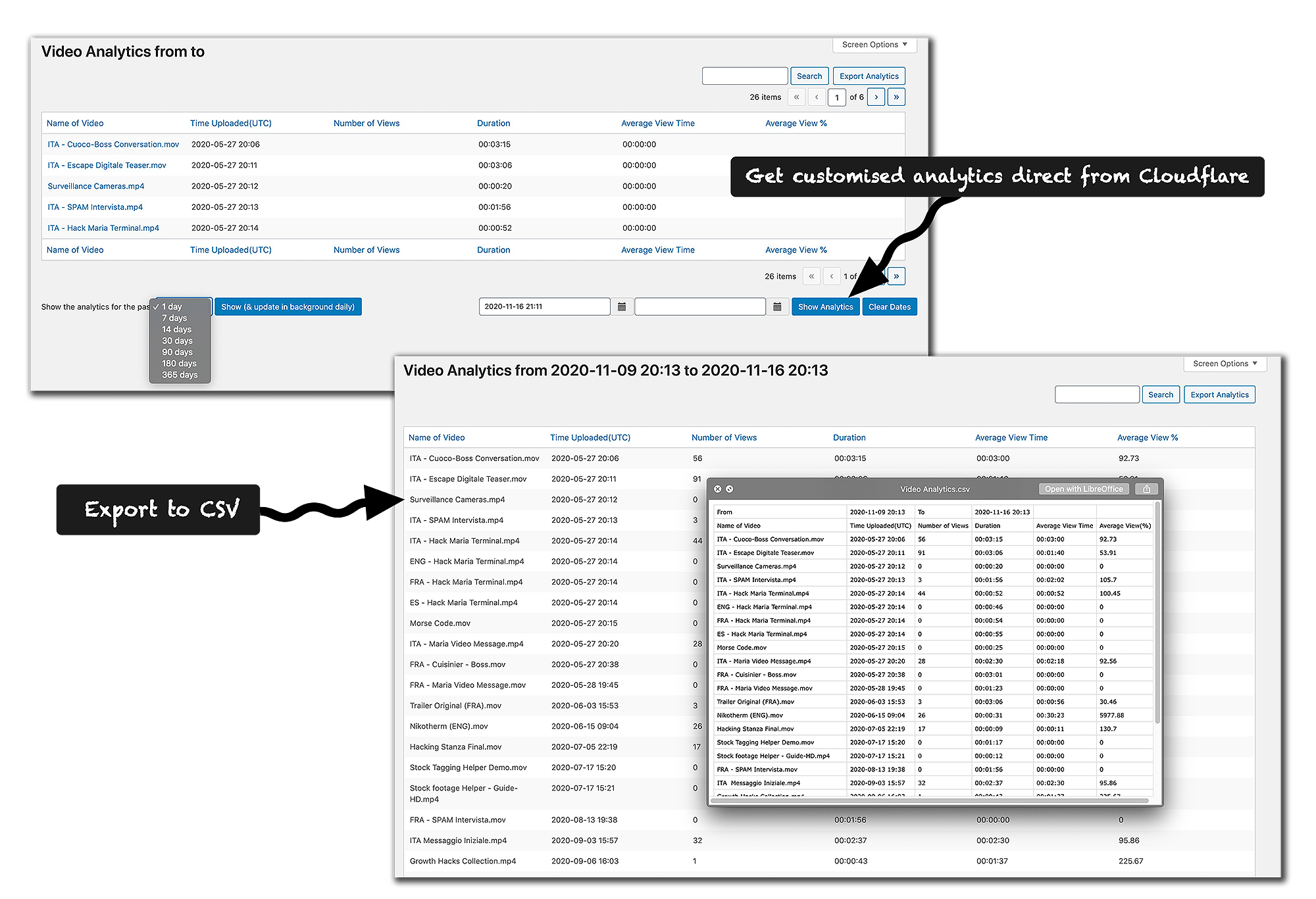
Get all of your Cloudflare Stream videos analytics directly in WordPress and export them in CSV.

CF Power Tools WordPress Plugin Core Features

We take reliability, security and usability seriously.

Prevent download

Prevent download of your videos by signing their URLs and domain whitelist you want to stream from. Everything is done behind the scenes in a few clicks and is completely under your control.

Easy Video Import

Easily import all of your videos from Cloudflare Stream in bulk or one by one. You can also upload a video from a public URL (ie. youtube) and let us do the work for you. You will get all of those videos in our CF Power Tools WordPress plugin.

Manage them all

Manage all of your videos from within Wordpress. Easily copy-paste your shortcode from within the interface, and see all the video’s details in one single click.

Шорткоды

Fully compatible with Elementor and WPBackery through a native integration and with Gutenberg and any WP theme with our generated video shortcodes. Compatible with all Cloudflare Stream parameters (loop, poster image, autoplay, mute, etc).

Аналитика

Смотрите видеоаналитику прямо из WordPress: количество просмотров, продолжительность, среднее время просмотра, средний просмотр % и т. д. Поиск и фильтрация по дате. Получите статистику за предыдущие дни, недели или месяцы и экспортируйте все в CSV одним щелчком мыши.

Updates & Support

CF Power Tools WordPress Plugin is regularly maintained and updated. We continually improve it (see Features Roadmap) taking note of WordPress and Cloudflare Stream changes. See our changelog для получения дополнительной информации.

CF Power Tools Expert

for entrepreneurs or SMB

unlimited & full access usage

€250

Year

  • 5 Websites license
  • Apply license on staging, then switch on live
  • Fast, friendly and HUMAN customer support 😉

Рабочий CF Power Tools

for single website owner/manager

unlimited & full access usage

€139

Year

  • 1 Websites license
  • Apply license on staging, then switch on live
  • Fast, friendly and HUMAN customer support 😉

CF Power Tools Master

for large organisations

GET

in touch

  • X Websites license
  • Renewal discount
  • Fast, friendly and HUMAN customer support 😉

Included in ALL plans:

Есть сомнения или вопросы? Общайтесь с нами!
политика возврата денег cfpowertools

Если в течение следующих 14 дней вам не понравится CF Power Tools, мы вернем 100% от стоимости вашей покупки.
Никаких вопросов.

1. CF Power Tools is installed on hundreds of websites. There’s a reason why our customers maintain their CF Power Tools subscription – they appreciate the benefits of it!

2. Одним из наших основных убеждений является то, что мы ставим наших клиентов на первое место - ВСЕГДА - и мы делаем все возможное, чтобы ваш опыт работы с CF Power Tools был успешным.

This guarantee covers a full 14 days no questions asked, and during that time, we will do everything possible to help you succeed.

Спасибо, и мы надеемся, что скоро станем частью вашей истории успеха!

CF Power Tools WordPress plugin is fully compatible with any theme and plugin, because it uses shortcodes:

wp
divi
gutenberg
VC horizontal
elementor
wc

Our FAQ

Cloudflare stream is an A-level, reliable and cost-effective streaming platform and it’s an external service with nothing to do with CF Power Tools). Videos can be streamed smoothly across +200 cities in more than +100 countries.

CF Power Tools is a plugin which brings the full power of Cloudflare Stream service to non-techy people into Wordpress. In a few clicks you can install it and protect your videos by preventing their download whilst still allowing streaming. You will also have detailed analytics directly within Wordpress and many other features.

You need a WordPress website and a Cloudflare Stream account.

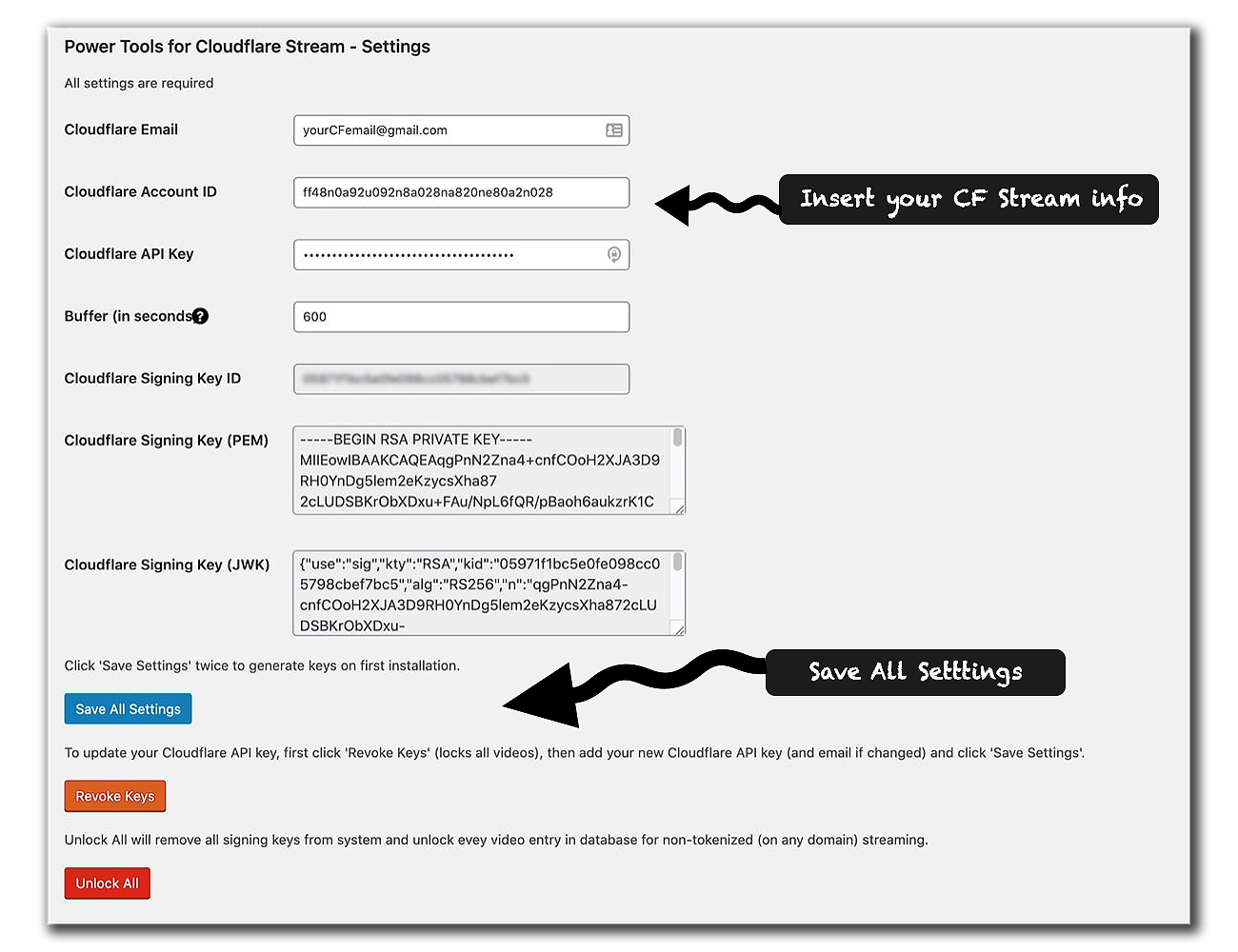
Simply get one of our plans, follow our easy installation guide and you will be ready to stream your CF Stream videos from within Wordpress.

CF Power Tools was conceived with non-techy people in mind. You won’t deal with any complicated codes or API calls. Most of the work is done behind the scenes without you and all settings are within easy reach from the WordPress dashboard.

Absolutely not.

Signed-URLs (ie. video protection) is done in a few milliseconds through API calls at the page loading. Page load time won’t be affected in a perceivable way. CF Power Tools doesn’t impact at all on your video streaming, it comes directly from Cloudflare.

Absolutely.

For each video in your library a shortcode will be generated. You just need to integrate that shortcode on any page/post you want for the player to appear and your protected video to be available for streaming. This is regardless of your theme. On top of that we built a WpBakery and Elementor dedicated block.

Cloudflare stream is an A-level, reliable and cost-effective streaming platform. Videos can be streamed smoothly across +200 cities in more than +100 countries.

When streaming content, you won’t have any advertising or cluttered interface.

With CF Power Tools, you will be able to protect your videos by preventing your viewers from downloading them. You will get detailed analytics directly from within WordPress and be able to export all of them to CSV.

Last but not least, check out all the advantages and features here.

Get an account on the external Поток Cloudflare platform.

Pick a plan and purchase CF Power Tools Wordpress plugin.

Follow our simple step-by-step install guide.

Upload your videos from a publicly accessible URL from our plugin (or from your computer using the Cloudflare interface).

From the CF Power Tools library page, copy the shortcode of each video and paste it where your Youtube link is in your pages/posts.

Sure, from your WP dashboard click on “CF Power Tools” menu then click “License”. Just deactivate the license from the old website, then install and activate it on the new website whenever you want. Feel free to reach up to us if you have any issues regarding this step.

If you are not entirely satisfied with your product, you get 14-day money-back guarantee, no questions asked.

You can use any debit or credit card, CoinPayments (cryptocurrencies) and Stripe (iDeal, Giropay, Sofotrt, Bancontact, Multibanco, etc).

The first thing you should do is to revoke the signing key.
Click on Wordpress CF Power Tools menu and hit the red button “Revoke Keys”. 
Then insert Cloudflare information again and click on “save all settings”.

This procedure will probably solve your problem. If it’s not the case, pls связаться with us.

Get CF Power Tools WordPress Plugin

Импортируйте видео, подписывайте URL-адреса и получайте аналитику с помощью одного-единственного плагина.
Установите и настройте его за 2 минуты, а затем воспроизводите любимые видео из WP.